In industrial manufacturing and research settings, lasers play a critical role.If the equipment suddenly fails, it may directly cause the production line to stagnate and push up the overall production cost.Therefore, the ability to quickly identify problems and efficiently carry out corrective repairs is an issue that every industry professional—especially production managers—must pay close attention to. This article compiles common laser fault codes and provides associated standardized, lightweight troubleshooting procedures that can be used by on–site personnel for quick reference during practical operations.
(i) Prerequisites for Safe Operation
All troubleshooting operations must prioritize personal and equipment safety, and strictly adhere to pre–operation safety guidelines: Before diagnosing electrical or water system faults, one must cut power to the entire unit and wait for the capacitors to discharge for three minutes before proceeding with any operations. When coming into contact with an equipment’s light output port, you must wear appropriate wavelength protection. Laser safety glasses – It is strictly prohibited to look directly at a laser’s output port.
(ii) Basic Status Verification
(iii) Fault Data Retention
Before beginning an investigation, it is important to first preserve fault data。This facilitates remote after–sales support for decision–making and problem tracing : it stores the host computer’s alarm logs, operation logs, and runtime logs; accurately records alert codes and fault trigger scenarios (triggered at startup, triggered during processing, or triggered under no–load conditions); and preserves screenshots for reference.
(i) Communication-type Failure
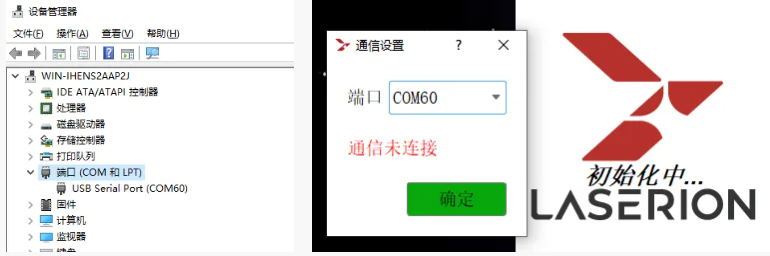
Failure code: nil, top-level communication interrupted
(The top-end prompts “Communication is not connected”)
Cause analysis: The RS232 serial port became loose; the host computer’s COM port was incorrectly selected; the serial cable was damaged; and the computer’s C++ runtime library was missing.
Detecting and resolving:
① Open the computer’s Device Manager to identify the COM number associated with the USB Serial Port, and then select the corresponding port in the host computer’s communication settings.
② Replug the RS232 communication line of the masher, or replace the spare serial line test;
③ Reload the system VC + + Runtime Library (random U disk), restart the computer and lightening device;
④ If the above operation is not effective, it is determined to be a fault of the internal communication board of the laser, and it is prohibited to self-destruct the machine, directly contact after-sales service.
Failure code: 9216
(The current HMI version is not supported)
Root cause analysis: The host computer software version is incompatible with the laser’s firmware.
Detecting and resolving:
① Restart the top-level software to reconnect to temporarily fix occasional version adaptation failures;
② Contact sales staff to get a special PC installed package update that matches the SN number of the Maser.
(ii) Safety Stop / Interlock Type Failure
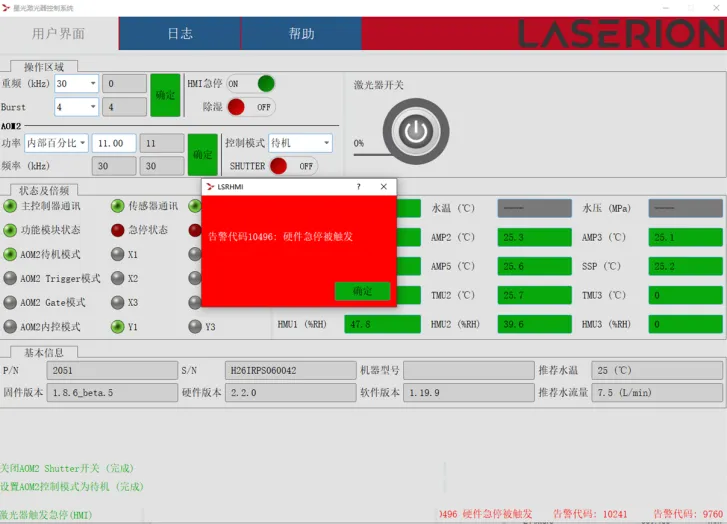
Fault Code: 10496
(Hardware pause triggers, and the top-level machine has a red alert indicating a pause and disconnect)
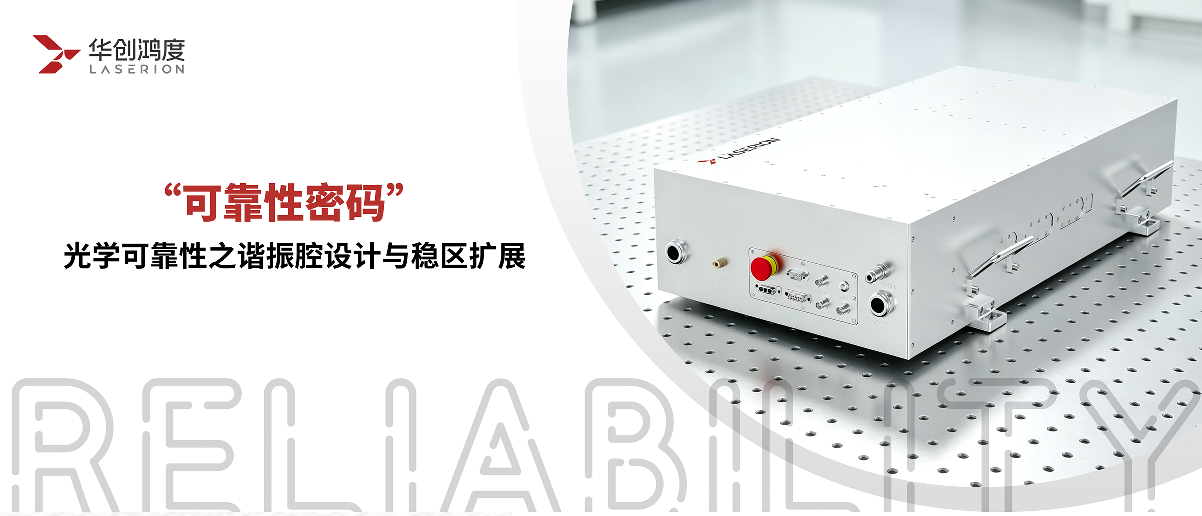
Cause analysis: The red E–Stop emergency stop button on the device panel was pressed; DB15 emergency stop ( E–STOP )The shorting terminal has become loose, and the external cascade emergency stop circuit has been interrupted.
Troubleshooting steps: ① Rotate the laser panel’s red emergency stop knob clockwise to confirm that it pops back into place;② Disconnect the DB15 interface and examine whether the I / O pins pause (E-STOP) shortcut is connected properly;③ If a cascading emergency stop device has been connected externally, check whether the external switch circuit is open.
Failure code: 10497
(Hardware emergency stop is normal, software interface prompts “HMI emergency stop”)
Cause analysis: The emergency stop function of the host computer software was manually activated, triggering a software lock–out protection mechanism.
Troubleshooting solution: Simply click the emergency stop button on the host computer’s HMI to switch it to ON, which will display a green status and clear the alarm.
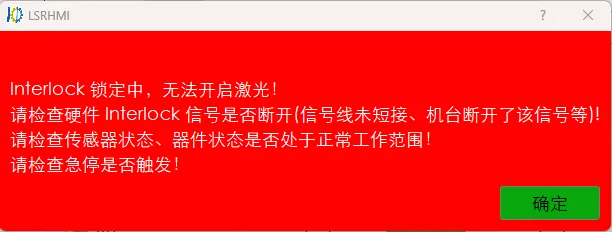
Fault Code: 9760-9770
(Interlock pop-up)
Cause analysis: The DB15 interface interlock (INTERLOCK) was shorted and then disconnected。 The machine’s safety door interlock signal was interrupted, and the laser’s internal components had not reached their normal light–emitting state.
Detecting and resolving:
① Confirm that the DB15 male head is completely inserted and the internal interlock pin is plugged in good condition;
② Check whether the magnetic absorption switch of the equipment security door is closed and the signal line is broken;
③ Temporary test can replace the backup short connection DB15 connector verification, still reported as internal interlock line fault,
④ The laser itself is not in a normal luminous state, check whether the sensor, device, etc. state is within the normal operating range, such as not reaching the flow rate, and not reached the multi-frequency temperature.
(iii) Temperature Control / Water Cooling System Failure
Error code: 9731/10499
(The pump source temperature abruptly stops, and the laser starts automatically locking in a few seconds)
Root cause analysis: The host computer’s AMP temperature value exceeded acceptable limits or was abnormal; the water–cooled machine’s water temperature, flow rate, and water quality did not meet required standards; and sensors were damaged.
Detecting and resolving:
① Check the operation status of the water cooler to ensure that the water temperature is maintained stable at 23 ° C, and the refrigeration function is normally stopped and not malfunctioning;
② Confirm that the flow rate of the water cooler reaches the standard 6L / min, the water pipeline is not squashed, bent, blocked, and the water circulation is smooth;
③ Clean the filter of the water cooler tank in time, replace clean deionized cooling water, and improve the water quality working conditions;
④ After adjusting the water temperature, flow rate, and water quality, the top-end temperature data remains unchanged, which is determined to be damaged by the temperature sensor. It is prohibited to self-tear the machine, contact after-sales to replace the accessories.
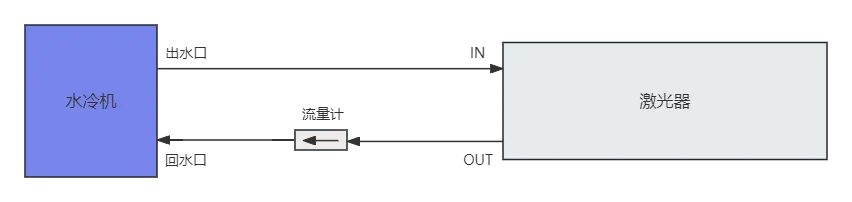
Error code: 9734/10502
(An abnormal water flow triggers a stop.)
Root cause analysis: The host computer’s water flow reading was either 0 or fell outside the normal range, triggering an emergency stop。The water flow direction does not match the direction indicated on the flow meter; the pipeline is blocked; the connections are loose; or the flow meter is damaged.
Detecting and resolving:
① If the value shows zero, check the water cooler inlet and outlet pipes. The direction of the water flow is consistent with the direction indicated by the flow meter arrow.
② If the value is 0 and the water flow is in the correct direction, check the flowmeter for impurities blocking, which can be removed and rinsed with a gas gun;
③Check that the plugs of the flowmeter are fully plugged in and locked on the panel interface (FLOW SENSOR);
④ Direct replacement testing; If the replacement flow meter still does not have a flow reading, it is determined that the motherboard flow detection circuit is faulty.
Error code: 9736–9752
(Monitoring system sensor data anomalies)
Cause analysis: AMP temperature sensor data inside the chamber, sudden changes in chamber humidity, missing readings, or extremely abnormal values。Signal interference; sensor / main control module malfunction.
Detecting and resolving:
① Power out and restart the whole machine to eliminate transient sensor signal interference;
② The data is still abnormal after reboot. The internal sensor line is faulty. Contact after-sales service.
After the on-site basic inspection and spare parts replacement operation is ineffective, never dismantle the machine yourself to avoid widening the equipment failure. When repairing, you need to provide equipment SN number, corresponding alarm code, fault log and other information, so as to facilitate the rapid positioning of the problem after sale and efficient repair.
If you would like to learn more about laser maintenance expertise or submit a service request online, please follow the official after–sales public account “Huachuang Hongdu Technical Support” 。 The platform supports accessing technical articles, submitting after–sales service requests online, and instantly retrieving after–sales contact information—all of which provide comprehensive protection for stable equipment operation.
Trailer for the series
This article focuses on the rapid self-inspection and standard disposal of the explicit warning code of lasers, and focuses on core contents such as the identification of invisible faults without warning of equipment, fault grading standards, and daily preventive operation and maintenance. We will dismantle them in detail in the next article. Please continue to pay attention!